MP3 Tag Editor Pro: Your Free, Private, and Powerful Online MP3 Metadata Editor
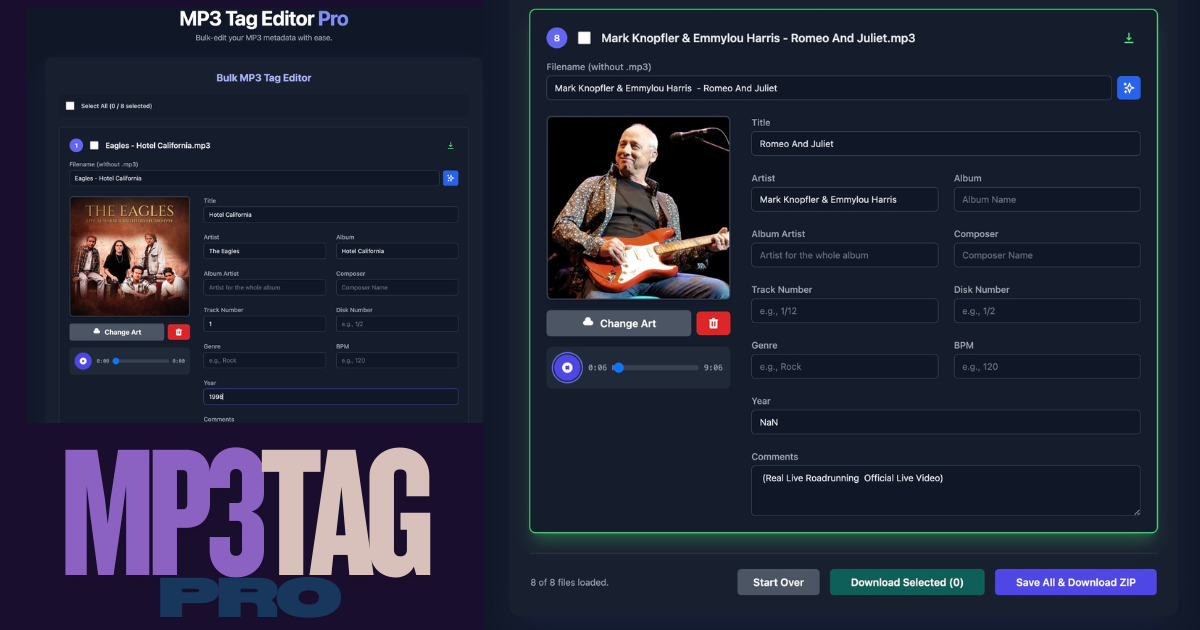
Managing a digital music library can quickly become overwhelming as collections grow larger and metadata inconsistencies pile up. Song titles may be incorrect or missing; album art may be absent, and file names could be a jumble of unhelpful text. These common issues make it harder to find and enjoy your music collection fully.
Thankfully, MP3 Tag Editor Pro provides an easy-to-use, free mp3 tag editor online that runs completely in your browser. Whether you want to correct individual songs or tidy up entire albums, this tool offers a secure and privacy-conscious way to edit id3 tags online without installing any software. Your files stay on your computer at all times, empowering you to manage your collection securely and efficiently.
A Modern Solution to Metadata Management
The online music tag editor space has traditionally been dominated by software requiring installation or uploading files to a cloud server. MP3 Tag Editor Pro breaks that mold by using client-side processing to read, edit, and save MP3 metadata entirely within your browser. This means:
- Your MP3 files never leave your device.
- File privacy and security are fully maintained.
- Edits are processed instantly without delay.
- There is no need to trust any third-party server.
This approach differs significantly from many existing tools that either compromise your privacy or require complex installations, making MP3 Tag Editor Pro uniquely suitable for users passionate about security and simplicity.
Understanding MP3 Metadata and ID3 Tags
MP3 files contain metadata stored in ID3 tags, which hold key information about the audio file. Common ID3 tag fields include:
- Title
- Artist
- Album and Album Artist
- Track number and Disc number
- Year of release
- Genre
- Composer
- BPM (beats per minute)
- Comments
- Album art
These tags don't just contain textual data but also embed images like album covers, allowing music players to display rich, informative interfaces while playing songs.
Inconsistent or missing tags degrade organization and playback experiences in music players. That's where a dedicated mp3 metadata editor online is invaluable to efficiently review and modify tags according to your preferences.
Key Features of MP3 Tag Editor Pro
1. Effortless Single and Bulk Tag Editing
MP3 Tag Editor Pro features both a single file mode and a bulk editor allowing you to load up to 20 MP3 files (combined size up to 300MB). It offers full control over a wide array of tags, making corrections or updates fast and accessible.
The bulk interface provides individual editing panels for each file, letting you tailor changes for every track within the batch. Whether you want to correct the artist's name on one track or update album-wide metadata for many songs at once, this flexibility saves time and headache.
2. Intuitive Album Art Management
Album art is a crucial part of the music listening experience, and MP3 Tag Editor Pro shines here with a user-friendly interface for adding, changing, or removing embedded images. Supported formats include JPEG and PNG.
You can upload images via a traditional file dialog or simply drag and drop photos onto the album art placeholder, making it simple to visually enhance your collection with the correct artwork.
3. Intelligent Filename Generation
File names that don't match your metadata can create confusion when browsing locally. MP3 Tag Editor Pro’s filename generator creates clean, standardized names using track metadata — typically producing results like:
Artist – Album – 01 – Song Title.mp3
This automatic renaming helps bring consistency and order to your music library's file system without manual renaming efforts.
4. Built-in Audio Preview
To avoid editing the wrong file, the editor incorporates a compact audio player for each track. You can play, pause, and scrub through the audio directly within the editing panel. This feature is especially useful in batch mode, where a highlighted playing track visually guides you to the file being previewed.
5. Flexible Download Options
Once tagging is complete, download your updated MP3s effortlessly. Options include:
- Download individual files
- Download selected files only
- Download all processed files bundled as a ZIP archive, with automatic duplicate filename detection
This flexibility accommodates a variety of workflows and preferences.
Why MP3 Tag Editor Pro Stands Apart
Many familiar ID3 tag editors require software installation, restricting accessibility. Others upload files to cloud servers, raising privacy concerns. MP3 Tag Editor Pro solves these issues with a fresh architecture:
- Zero uploads: Files remain local to your browser.
- Instant feedback: Immediate edits without waiting for server processing.
- Cross-platform compatibility: Works on any modern browser without installation.
- Free to use: No fees, subscriptions, or usage limits.
This makes it an ideal companion for privacy-conscious users who want control without complexity or hidden costs.
An Overview of MP3 Tag Editing and Why It Matters
Marking metadata accurately is more than just organization—it improves your entire listening experience. Correct tags allow media players and devices to sort music by artist, album, genre, or year. Album covers add a visual layer to playlists, and filenames that match tags improve file management outside of players.
Failing to maintain metadata can lead to a jumbled library, repetitive manual fixes, and difficulty sharing collections. With MP3 Tag Editor Pro, the editing process is fun, fast, and fully under your control.
Tips for Using MP3 Tag Editor Pro Effectively
- Start with a single file: Familiarize yourself with the interface and tag field options.
- Use bulk edit for albums: Upload entire albums to standardize artist names, genres, and album art quickly.
- Utilize filename generation: Keep your file system tidy by renaming tracks to match your metadata.
- Preview tracks as you edit: Avoid mistakes by verifying audio content before saving changes.
- Backup files: Though edits are local, keep backups of originals before batch operations for peace of mind.
Frequently Asked Questions
- Is my music library ever uploaded?
- No. All edits happen locally in your browser. Your files stay on your machine.
- Can I edit album art?
- Yes, you can add, remove, or replace album art images easily right from your computer.
- Can I work with multiple files at once?
- Absolutely. Up to 20 files can be loaded simultaneously for bulk tag editing with individual track controls.
- Is this tool really free?
- Yes, MP3 Tag Editor Pro is completely free with no hidden fees or subscriptions.
- Which browsers support MP3 Tag Editor Pro?
- Most modern browsers, including Chrome, Firefox, Edge, and Safari, fully support this online tool.
- What file formats does this editor support?
- Currently, it supports editing ID3 tags in MP3 files only. Support for other audio formats may be added in the future.
- Do I need to install any software?
- No software installation is required. It works entirely in your web browser.
- Can I restore original files if I make a mistake?
- Since edits happen locally, your original files remain untouched until you save and download changes. Keeping backups before batch operations is recommended.
- How large can my files be?
- The bulk editor supports a total size of up to 300 MB across all selected files.
- Can I edit rare or custom ID3 tags?
- The tool supports the most common ID3 tag fields. Advanced or custom tags may not be editable at this time.
About ID3 Tag Formats Supported
This tool specializes in editing ID3 tags common to .mp3 files. ID3 tags come mainly in two versions:
- ID3v1: Basic tags stored at the end of the MP3 file.
- ID3v2: More comprehensive tags stored at the beginning, supporting images and extended text fields.
MP3 Tag Editor Pro handles both standards, providing broad compatibility with existing MP3 libraries.
How to Get Started?
Visit mp3tagpro.com today, select your MP3 files (single or batch), and start customizing your music metadata using a powerful, intuitive interface with complete privacy and zero cost. This is your best free mp3 tag editor online solution for managing your music library securely and efficiently.
Conclusion
MP3 Tag Editor Pro delivers a unique combination of user-friendly design, high-level features, and strong data privacy. Whether cleaning up a few tracks or a large music collection, this online mp3 tag editor offers effective tools to enhance metadata, filenames, and album art without uploading files or installing anything.
For anyone serious about organizing their music collection while keeping control of their data, MP3 Tag Editor Pro is a must-have web utility.